Inputs and controls
Wire media into a tool, type text on the node, and adjust its sliders, dropdowns, and switches.
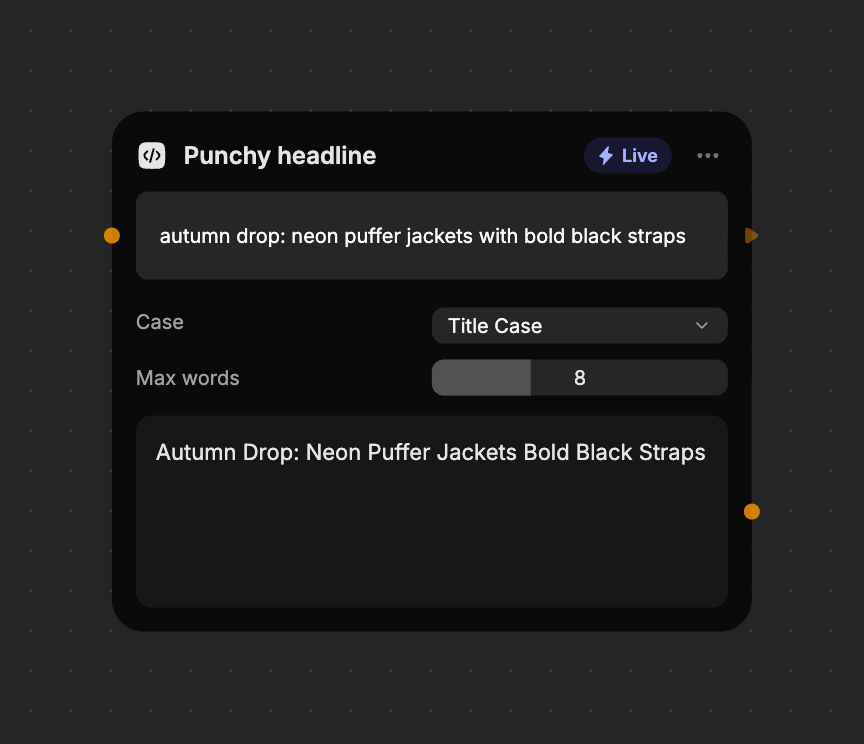
A built tool has three parts, from top to bottom: its inputs, its controls, and its results. Fuser designs all three from your prompt.
Inputs
Inputs are what the tool works on. Each has a socket on the left of the node, named after its role, such as Photo or Base and Overlay. A tool can have up to four.
| Input kind | What to connect |
|---|---|
| Image | An Image node, a generator's image, or another tool's image result. Animated GIF and WebP work too. |
| Video | A Video node or a video result. |
| Audio | An Audio node or an audio result. |
| 3D mesh | A Mesh node. Tools can picture, measure, and count a model, but not change it. |
| Text | A Text node or a text result, or type straight into the box on the node. |
Some inputs accept a list. Connect several wires to the same socket, for example to lay out a contact sheet from many images. Optional inputs let the tool run without them.
Until a required input has something to work with, the result area says Wire in an input to see the result. If the connected node has nothing yet, it says The node wired in has no result yet.
Numbers arrive as text. To feed a value from another node, wire it into a text input.
Controls
Controls are the settings you adjust on the node. A tool can have up to eight.
| Control | Use |
|---|---|
| Slider | An amount, size, or count. Sizes are relative to the media, so a preview matches the full-size result. |
| Dropdown | A choice between named options, such as a blend mode or a palette. |
| Switch | Turn part of the effect on or off, such as Invert. |
Each drag of a slider is one undo step. Controls stay on the node; they don't have sockets, so you can't wire values into them.
Want a different control? Edit the tool and describe it, for example “Add a switch to keep the original colors.”
The result
The result sits at the bottom of the node, with an output socket you can wire into other nodes. A tool that makes separate pieces, such as the four views of a turnaround, has a result and a socket for each, up to eight. Each one can be wired, downloaded, or saved on its own; a failed run fails them all together.
| Result kind | Shown as |
|---|---|
| Image | The image, framed at its own shape. |
| Video | A player. |
| Audio | A player. |
| Text | A text box. Long text scrolls. |
| Data | Structured data shown as formatted text, for lists and measurements. |
Text and data results can be downloaded as a file. Some download in a matching
format,
such as subtitles (.srt) or a spreadsheet (.csv). See
Running tools for saving media results.
Who can change what
Anyone who can view a project sees Live tools compute and Cloud tools' saved results. Only people who can edit the project can change inputs and controls, run Cloud tools, or edit the tool.